Mod Settings and UI Introduction
12/15/25...About 2 min
Mod Settings and UI Introduction
Mod Settings
The following are the custom settings provided by the mod's settings interface:
Language:
| Name | Default Value | Description |
|---|---|---|
| Language | Chinese | The mod currently only supports English and Chinese |
Function:
| Name | Default Value | Description |
|---|---|---|
| Special Item Fix Protection | Disabled | Once activated, it will prevent special items from being traded (becoming fixed position), such as Soaring Dragon and Portable Power Charger |
| Surveyor Light Toggle | V | Shortcut key for lighting |
| UAV Summon Key | Z | Shortcut key for summoning drones |
| Skill Activation Key | X | Activate the current drone's skill |
| UAV Type Switch Key | R | Shortcut key for switching drone types |
Skill Parameters:
| Name | Default Value | Description |
|---|---|---|
| Skill 2 Attack Speed Reduction Ratio (Multiplicative) | 0.4x/0.5x (Default) | Skill 2 reduction ratio for Elite 1/Elite 2 |
| Skill 3 Damage Multiplier (Multiplicative) | 2.5x (Default) | Skill 3 damage multiplier for Elite 2 |
| Skill 1 Cooldown Time | 30 seconds (Default) | Cooldown time for Skill 1 |
| Skill 2 Cooldown Time | 44 seconds (Default) | Skill 2 cooldown time(Based on Elite Level) |
| Skill 3 Cooldown Time | 38 seconds (Default) | Skill 3 cooldown time(Based on Elite Level) |
| Skill 4 Cooldown Time | 30 seconds (Default) | Cooldown time for Skill 4 (based on mod stage) |
| Skill 4 UAV Summon Cooldown | 10 seconds (Default) | Skill 4 UAV summon cooldown time |
Skill-related Sound Effects:
| Name | Default Value | Description |
|---|---|---|
| Character Skill Voice Volume | 50% (Default) | Voice volume triggered when the character uses a skill |
| Drone Attack Hit Volume | 50% (Default) | Volume triggered when a drone hits a target |
Strange little Function:
| Name | Default Value | Description |
|---|---|---|
| Death Sound Effect | Disabled | Plays death BGM when the character dies (Audio creator Bilibili: DJG杰哥) |
| Evil Penguin Mode | Disabled | Unify all UAV summon cooldown to 1 second when enabled |
Key Bindings
The following are the commonly used key bindings in the mod:
| Function | Default Key | Description |
|---|---|---|
| Surveyor Light Toggle | V | Turn on/off the survey instrument's lighting function |
| UAV Summon Key | Z | Summon the currently selected drone |
| Skill Activation Key | X | Use the current drone's skill |
| UAV Type Switch Key | R | Switch between different types of drones |
Notes
- Drone skill activation requires a drone to be present
- Switching drone types requires no drones to be present
- The maximum number of drones that can be summoned varies by Elite stage
Skill UI
The following are the commonly used skill UI elements in the mod:
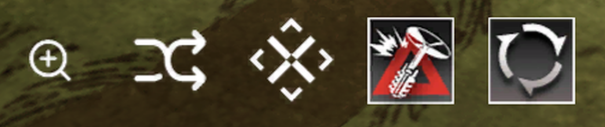
From left to right in the image:
| Function | Description |
|---|---|
| Hide/Show UI | Click to hide/show the skill icons section |
| Switch Drone Type | Click to switch between drone types |
| Summon Drone | Click to summon a drone |
| Use Drone Skill | Click to use the drone's skill |
| Recall Drones | Click to recall all present drones |